

Canva Craft Product Photography: A Ceramic Cup Brief
Canva Craft Product Photography can begin with a tightly specified product-scene brief: what the object looks like, how it sits on the surface, where the light comes from, and which details must remain believable.
This worked example uses a fictional, unbranded ceramic espresso cup. The goal is a product-image concept that a small ceramics business could review before commissioning a shoot or preparing a listing. It does not document an existing SKU or demonstrate preservation of a real product reference.
Define the object before the atmosphere
The product has one round handle on the right, an off-white matte glaze, an empty interior, and a matching saucer. Those details matter more than the phrase “premium product photo.” They give you something specific to reject if the generated geometry is wrong.
The scene is intentionally sparse: a limestone surface, a beige backdrop, one broad soft light, and no props. That makes the cup easier to inspect and reduces the chance of a decorative object being mistaken for something included in a sale.
| Scene decision | Recipe | Reason |
|---|---|---|
| Output shape | Square 1:1 | Leaves room for a simple catalog-style composition |
| Viewpoint | Three-quarter tabletop view | Shows the rim, handle, and saucer together |
| Light | Broad soft source from upper left | Describes volume without hard glare |
| Surface | Pale limestone | Adds texture without distracting from the glaze |
| Product copy | None | Avoids inventing a label or product claim |
| Props | None | Keeps the deliverable focused on a single object |
Canva lists product imagery among Craft’s use cases in the launch announcement. This tutorial concentrates on art direction and inspection rather than claiming a measured level of product fidelity.
Generated product concept and exact prompt
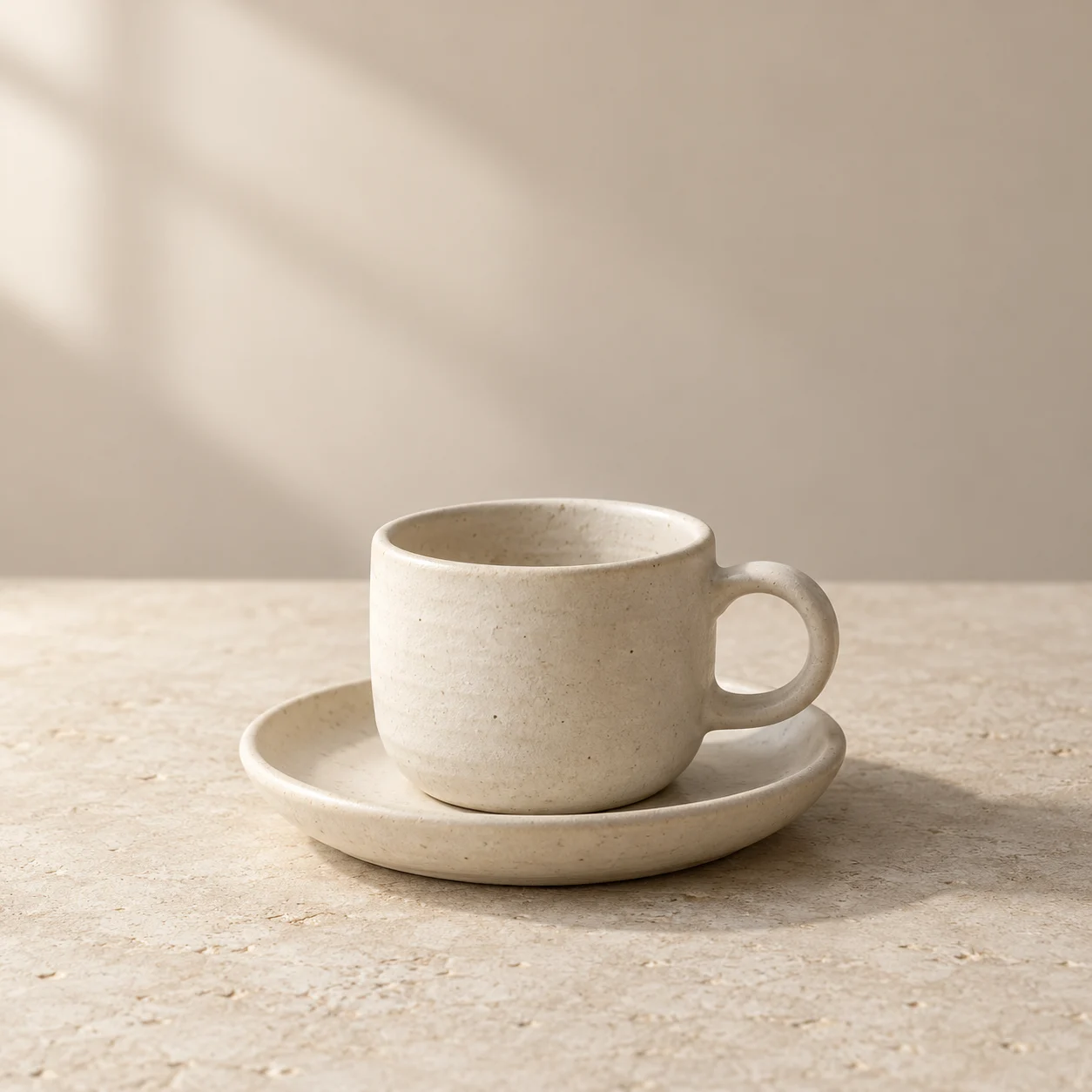
Original generated product concept for a fictional item. Produced with Codex’s image generation tool, not a photographed SKU, a recorded Canva Craft output, or a client commission.
Photorealistic studio product concept photograph for a fictional unbranded handmade ceramics collection. Square 1:1 composition. One matte off-white ceramic espresso cup with a single round handle on its right, matching low saucer, empty interior, cup centered slightly below the middle, shot at a three-quarter tabletop angle. Warm light beige seamless backdrop and pale limestone table. Soft large window light from upper left, gentle contact shadow toward lower right, realistic matte glaze with subtle handmade texture, crisp product rim, natural proportions. Clean high-end catalog art direction, quiet negative space above. No other props, no liquid, no text, no logos, no watermark.
“Studio,” “window light,” and “three-quarter view” describe the desired appearance. They are not records of a physical camera, lens, aperture, or lighting setup. No photograph of a real cup was supplied.
Actual generation record
| Recorded field | Actual value for the illustration above |
|---|---|
| Generation tool | Codex built-in image generation |
| Input | Text prompt only; no reference image |
| Requested aspect ratio | 1:1, specified in the prompt |
| Returned source size | 1254 × 1254 pixels |
| Background | Opaque; transparent_background = false |
| Outputs retained | One original PNG and one compressed WebP |
| Seed, steps, guidance, exact model version | Not exposed by this tool; not recorded |
| Canva Craft run | Not performed for this illustration |
For a Craft run, choose square output and an appropriate resolution option, up to the documented 2K capability. Do not invent a reference-strength or seed value if the interface does not expose one. If you need an exact SKU, start with approved real product imagery in a workflow that supports the required fidelity.
Build and review the scene
1. Write a product fact sheet
For a real item, collect its dimensions, color, material, finish, handle shape, and included accessories. Mark which facts are essential to a buyer’s understanding. Keep the approved reference photographs beside the brief.
For this exercise, the cup is invented. The fact sheet is a creative specification rather than evidence that a corresponding product exists.
2. Choose one lighting direction
Start with the upper-left soft light in the prompt. Decide where the contact shadow should fall. Avoid asking simultaneously for flat catalog lighting, dramatic rim light, and an outdoor sunset.
A simple lighting direction makes inconsistencies easier to see: a shadow pointing against the supposed light source deserves attention even if the composition feels appealing.
3. Generate a square candidate
In Canva’s Dream Lab, choose Craft where available and select square composition. Paste the complete prompt and review one candidate before expanding to more scenes. The generation workspace can hold the same structured brief.
Save the output and the selected settings together. Keep “requested appearance” separate from “what the tool actually returned.”
4. Inspect the object at full size
In the displayed illustration, the cup has a visible open rim, one right-side handle, a matching saucer, and a grounded shadow. The material has small irregularities consistent with the handmade direction. The background also contains soft window-like shadows, so it is less uniform than a strict seamless catalog background.
If your destination requires a pure white background, this concept needs another pass or a separate finishing workflow. Do not call warm limestone a white-background listing image.
5. Decide whether it is a concept or a sellable representation
For a real listing, compare the handle opening, rim thickness, glaze color, saucer dimensions, and proportions with the actual product. A plausible ceramic cup is insufficient if the buyer will receive a different shape.
If those details cannot be verified, use the asset as internal art direction or clearly presented concept material. Keep actual product photography as the factual reference for the SKU.
Targeted revisions for common problems
| Problem | Proposed next prompt change | What to inspect afterward |
|---|---|---|
| Handle looks fused or doubled | “Exactly one open round handle, connected at two distinct points.” | Continuous geometry and believable opening |
| Glaze looks plastic | “Matte mineral glaze with fine natural texture; no glossy plastic sheen.” | Highlights and surface consistency |
| Saucer appears to float | “The saucer rests flat on the table with a visible soft contact shadow.” | Contact at the base |
| Background is too busy | “Uniform beige backdrop with no visible window shapes or decorative shadows.” | Product remains the dominant form |
These revisions have not been generated in this article. They are ways to isolate a defect while preserving the rest of the brief.
Plan a product-image set without promising consistency
A useful next set could contain a hero angle, a handle detail, and a scale image beside a measured object. Write each shot’s purpose before generating. A prompt that repeats “same cup” does not prove identical geometry across separate images.
For exact merchandise, keep measurements and actual source photos in the review process. Do not generate a measurement graphic and treat its proportions as evidence. If you want to turn an approved image direction into a campaign composition, continue with the cold brew ad exercise.
Export and handoff
The source is 1254 × 1254 pixels. Save that master and a compressed web derivative separately. Check the intended platform’s current requirements before choosing a final export, and avoid repeatedly saving a compressed image through multiple tools.
For a real product handoff, include approved references, the exact prompt, output dimensions, revision notes, and a clear status such as “concept only” or “approved against SKU photography.” That status is more useful to the next person than an unsupported label such as “photorealistic and accurate.”