

Canva Craft Social Media Ads: A Cold Brew Creative
Canva Craft Social Media Ads work best as a specific creative task: one audience, one message, one product, and a layout readable on a phone. This exercise builds a cold brew concept around the line SLOW BREW. BRIGHT START.
The product and campaign are fictional. The deliverable is a creative proof with a reusable prompt and an evaluation plan. No ad was launched, and there are no click-through, conversion, or sales results to report.
Start with the message and the placement
The imagined audience is people looking for a quiet morning coffee ritual. The creative shows one iced coffee glass rather than several lifestyle scenes. A cream headline area separates the words from the dark drink, and an orange disc supplies a sunrise cue without adding another message.
We use 4:5 as a chosen portrait design format. That is a composition decision for this exercise, not a claim that every social placement accepts the same dimensions or crop. Verify the intended platform and placement before uploading.
| Creative choice | Recipe | Review question |
|---|---|---|
| Copy | SLOW BREW. / BRIGHT START. | Can someone read both lines without zooming? |
| Product | One clear tumbler of iced coffee | Is the drink immediately identifiable? |
| Palette | Cream, brown, burnt orange | Does the headline separate from the scene? |
| Format | Portrait 4:5 target | Does it fit the intended placement? |
| Bottom zone | Quiet area for later finishing | Can approved brand copy fit without covering the glass? |
| Claim boundary | No health or performance promise | Does the image avoid inventing a product benefit? |
Craft’s launch article includes ads and social posts among its intended applications. Here, the useful task is coordinating a product scene with a short headline, then checking the actual result.
Generated creative and complete prompt
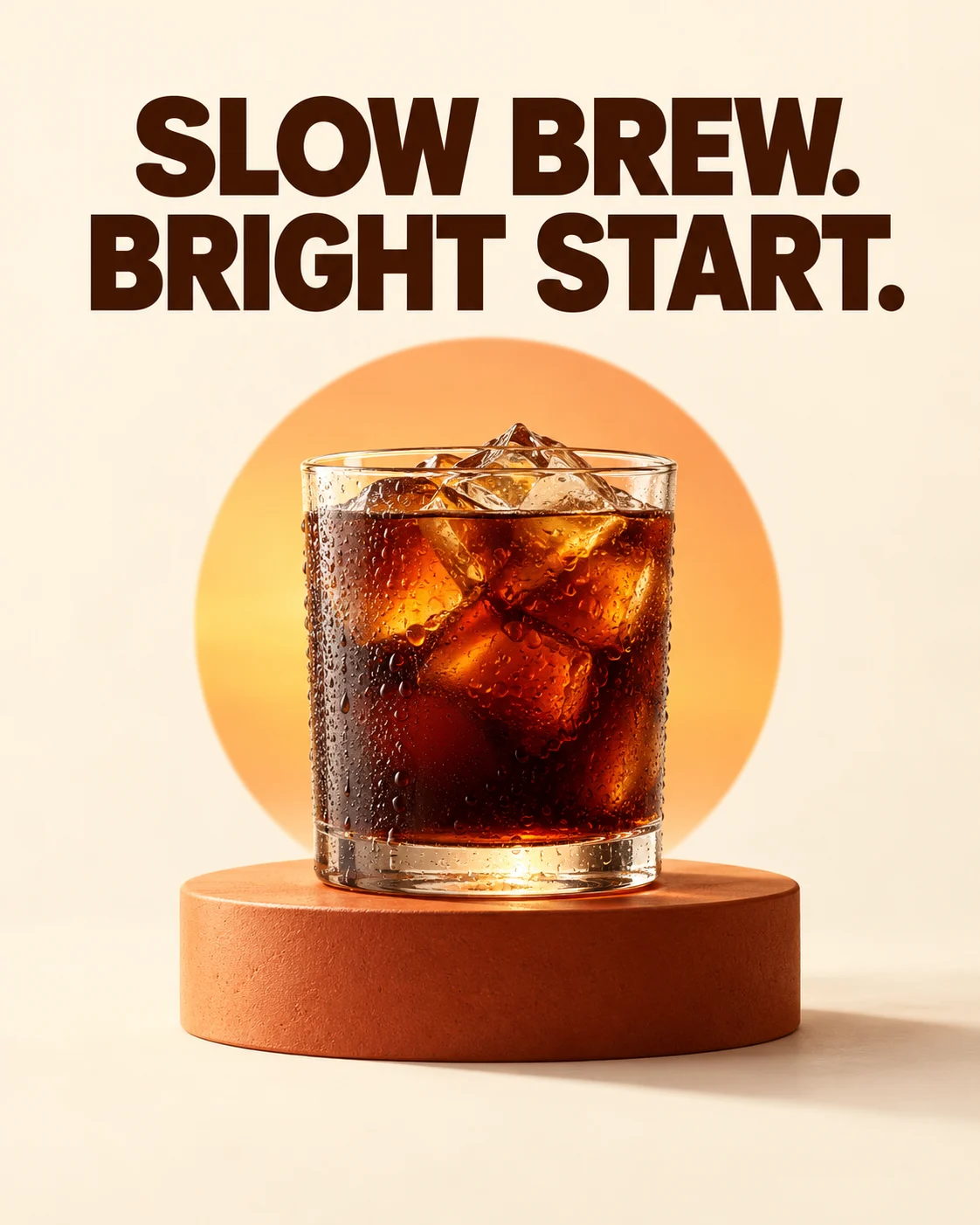
Original generated illustration for a fictional campaign. Produced with Codex’s image generation tool, not a recorded Canva Craft output, customer ad, or measured campaign result.
Create a finished portrait 4:5 social media advertisement concept for a fictional unbranded cold brew drink. Full bleed, no device mockup. Exact text only: "SLOW BREW." on first line and "BRIGHT START." on second line, large dark brown bold sans serif headline in the upper third on a clean warm cream background. A single clear straight-sided tumbler of dark iced coffee, visible irregular ice cubes and condensation, on a burnt orange pedestal in the lower half, photorealistic product lighting from upper left, soft contact shadows. One subtle orange sunrise disc behind the glass, clearly separate from the headline. Leave bottom 12 percent quiet and cream with no text. Strong restrained editorial advertising composition, comfortable margins, readable lettering. No logos, no prices, no button, no health claims, no watermark.
The ad deliberately has no price, discount, logo, or purchase button. Those elements need an approved offer and a real destination. Add them as editable assets when you finish the design.
Generation record and reproduction settings
| Recorded field | Actual value for the illustration above |
|---|---|
| Generation tool | Codex built-in image generation |
| Input | Text prompt only; no reference image |
| Requested aspect ratio | 4:5, specified in the prompt |
| Returned source size | 1122 × 1402 pixels |
| Background | Opaque; transparent_background = false |
| Outputs retained | One original PNG and one compressed WebP |
| Seed, steps, guidance, exact model version | Not exposed by this tool; not recorded |
| Canva Craft run | Not performed for this illustration |
The source is 1122 × 1402 pixels, approximately 4:5 rather than an exact 4:5 canvas. A mathematically exact 4:5 frame at 1120 pixels wide is 1400 pixels tall. For a required exact export, place or crop the source carefully on the destination canvas and recheck margins.
For Craft, select a 4:5 portrait option where available and a suitable resolution setting. Do not copy the recorded pixel dimensions as an assumed Craft API size parameter.
Make the creative step by step
1. Approve one sentence
Keep the two-line headline as the only generated copy. Confirm that it is appropriate for the actual product before using the concept commercially. If the campaign needs a time-limited offer, add only the approved wording later.
The phrase sets a mood. It does not substantiate a claim about caffeine, energy, health, or brewing time.
2. Describe product and layout together
Specify the glass, ice, condensation, pedestal, headline area, and bottom space in the same brief. The composition depends on those relationships: the glass needs enough room to be recognizable, while the headline needs a simple background.
Use the structured prompt guide to separate the message from the visual instructions.
3. Generate one review candidate
In Canva’s Dream Lab, choose Craft where available and select the portrait format. Paste the full prompt and keep the first result for comparison. You can prepare the same brief in the generation workspace.
Do not treat a candidate as an approved ad just because it renders successfully. Save the source and inspect it against the brief.
4. Perform a mobile-size review
The displayed example makes the headline large and gives the glass a clear silhouette. Its orange disc is larger and more central than the word “subtle” might suggest. The bottom area also remains part of the product scene rather than a fully isolated copy strip.
If you need a button or an offer at the bottom, finish on a larger canvas or regenerate with a more explicit blank zone. Do not place essential copy over the pedestal simply because the source has no room left.
5. Add brand, offer, and destination
Use approved brand assets and exact editable text. Keep sufficient separation between a call to action and the artwork. Add a real destination through the advertising platform, then preview the placement to see how interface controls affect the composition.
The image itself does not create a working purchase button. Likewise, an illustrated button cannot prove that a user can complete the advertised action.
Test a hypothesis rather than guessing a winner
Here is a proposed experiment, not a report of completed testing:
| Version | Variable to change | Hold constant | Hypothesis |
|---|---|---|---|
| A | Current orange sunrise composition | Audience, offer, landing page, copy | Warm morning styling attracts attention |
| B | Plain cream background without the disc | Same audience, offer, landing page, copy | Simpler background improves message clarity |
Use a real campaign setup to decide allocation, duration, and success criteria before running it. Keep a record of approved assets and platform results. Avoid changing both the headline and background if the question is specifically about the disc.
No percentage improvement can be inferred from these images alone.
Fix common creative problems
If the glass is too small, increase its relative scale while keeping the headline size. If the headline is crowded, simplify the background behind it. If condensation looks excessive, reduce that texture without changing the product shape.
If a real beverage has branded packaging, start a separate fidelity review against approved source imagery. This exercise uses an unbranded glass; it does not demonstrate copying a product label or preserving a bottle across edits.
Export the proof and prepare the next placement
Keep the original source, then create the exact size required for the chosen placement. A story format needs a new composition review; cropping a 4:5 frame to 9:16 can remove important content.
Inspect copy, product edges, and any added legal or offer text in the platform preview. Keep the image, prompt, settings, and revision notes together. For a simpler product-only direction before adding campaign copy, see the ceramic product scene.