

Canva Craft Poster Generator: A Night Market Poster
The useful part of a Canva Craft Poster Generator workflow is deciding what someone should read first. For this night market brief, that means a recognizable event name, one supporting time line, and an illustration that makes the evening feel inviting without covering the copy.
This worked example takes a fictional neighborhood event from a short brief to a concrete poster direction. You get the complete prompt, a generation record, a repeatable Craft workflow, and a finishing checklist. The goal is a reviewable design, not a claim about ticket sales.
The brief: one event, two pieces of copy
The organizer needs a portrait announcement for a community noticeboard and a digital preview. The approved words are NIGHT MARKET and FRIDAY 7 PM. We deliberately leave out a venue, full date, price, and booking address: those are factual details to add as editable text after confirmation.
Use a cream background so the navy headline has a quiet area. Put food stalls and lanterns below the copy. The illustration should communicate the atmosphere; it should not become a second source of event information.
| Decision | Recipe for this example | Why it matters |
|---|---|---|
| Composition | Portrait 2:3 | Gives the headline and illustrated scene separate zones |
| Text hierarchy | Event name first, time second | Makes the announcement understandable at a glance |
| Palette | Cream, navy, coral, warm amber | Keeps text separate from the illuminated scene |
| Main scene | Stalls across the lower half | Gives a recognizable event cue without filling every margin |
| Production boundary | Add confirmed logistics later | Prevents a changed address from forcing a complete regeneration |
Canva describes Craft as planning composition before rendering in its model announcement. For this exercise, translate that into an explicit relationship between copy and illustration rather than a string of style adjectives.
Generated example and complete prompt
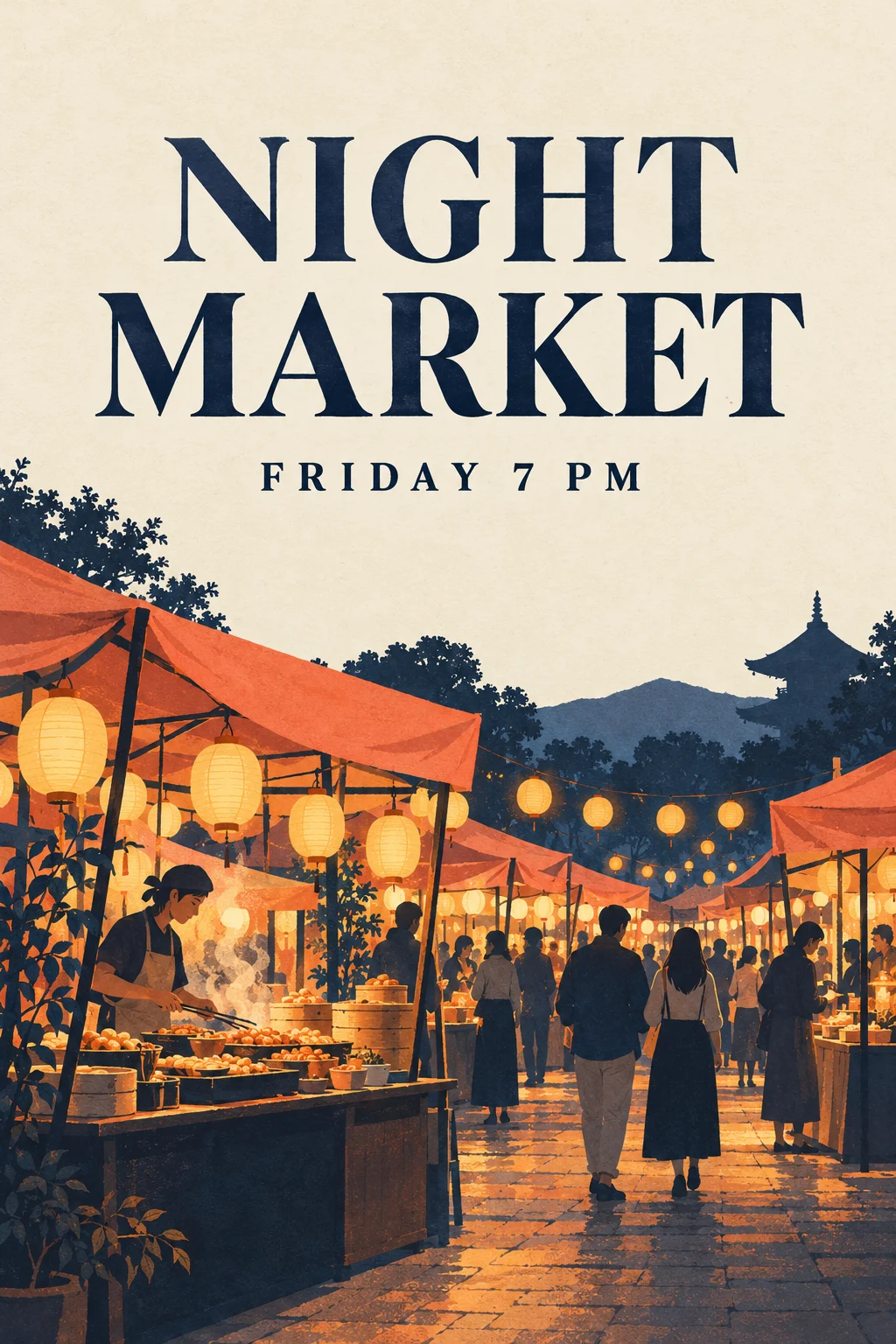
Original generated illustration for a fictional brief. Produced with Codex’s image generation tool, not a recorded Canva Craft output or a client commission.
Create a finished portrait 2:3 event poster, full bleed, not a photograph of a poster. Exact text only: "NIGHT MARKET" as a large navy headline in the upper quarter, "FRIDAY 7 PM" directly beneath in smaller navy lettering. Cream paper background, illustrated food market stalls in the bottom half, warm glowing lanterns, small human silhouettes, coral awnings, restrained navy and amber palette. Wide quiet margins. Keep the upper text region uncluttered. Print-like flat illustration with subtle paper grain, confident editorial layout. No additional lettering, no logos, no watermark.
The words inside quotation marks are the approved image copy. Everything else is an instruction about layout or appearance. To adapt the brief, change the event name and time together, then recheck whether the new text still fits the same space.
Settings and the actual generation record
| Recorded field | Actual value for the illustration above |
|---|---|
| Generation tool | Codex built-in image generation |
| Input | Text prompt only; no reference image |
| Requested aspect ratio | 2:3, specified in the prompt |
| Returned source size | 1024 × 1536 pixels |
| Background | Opaque; transparent_background = false |
| Outputs retained | One original PNG and one compressed WebP |
| Seed, steps, guidance, exact model version | Not exposed by this tool; not recorded |
| Canva Craft run | Not performed for this illustration |
These are separate from suggested Craft settings. For a Craft run, choose a portrait 2:3 format and the highest suitable resolution offered, up to its documented 2K capability. Use one image to review the layout before ordering more variations. Camera settings, a font file, and a print DPI value are not generation controls in this recipe.
Build the poster step by step
1. Freeze the copy before opening the generator
Write the two approved lines in a plain document. Confirm spelling and capitalization. Decide who will approve the eventual venue and date. An attractive generated date is still an error if the event organizer has not confirmed it.
2. Choose a portrait generation canvas
In Canva, open Dream Lab and select Craft where available. Select the 2:3 portrait option if the interface provides it; also keep the ratio instruction in the prompt. If you are preparing the brief on this site, use the generation workspace.
Do not start with a square image and assume a later crop will retain both the headline and the stalls. The aspect-ratio guide explains how to plan the composition around its destination.
3. Generate with the full layout brief
Paste the complete prompt. Keep its text and spatial constraints for the first attempt. Avoid adding several competing styles or extra slogans while evaluating whether the basic hierarchy works.
Save the result with its exact prompt, selected settings, and generation date. A matching seed alone would not be enough to reproduce a run across different model versions; this example has no exposed seed.
4. Compare the result with the brief
In the displayed illustration, the headline occupies two lines and the market recedes into the background. The time is separate from the scene. The stalls fill more than a narrow bottom band, which gives atmosphere but leaves limited room for additional information.
That is an editorial tradeoff visible in this image. If the final poster needs several lines of logistics, request a taller blank footer or place the illustration on a larger design canvas.
5. Finish factual details in editable text
Add the confirmed date, location, and booking information in a design editor. Keep those text boxes separate from the illustration. If you need a QR code, create and test a real code linked to the correct destination; do not ask the image generator to draw one.
Export a digital proof first. Send it to the organizer with the exact words listed beside it so copy approval does not depend on someone spotting a tiny error in the image.
Fix a specific problem without changing the brief
| Visible problem | Focused next instruction | Acceptance check |
|---|---|---|
| Headline overlaps the lanterns | “Keep the upper third plain cream and move every lantern below the time line.” | Every letter sits on a quiet background |
| Extra signs add invented words | “Remove lettering from all stalls; use only the two approved text lines.” | No readable or pseudo-readable labels in the scene |
| Event name is difficult to read | “Increase headline contrast and simplify the lettering.” | The event name is readable in a small preview |
| No room for venue details | “Leave the bottom fifth completely blank.” | A real text box fits without covering the illustration |
These are proposed revision prompts, not additional tested outputs. Change one instruction at a time so you can tell which adjustment helped.
Print and handoff checks
At 300 pixels per inch, the 1024 × 1536 source supports roughly 3.4 × 5.1 inches without enlargement. It is a useful concept proof, not a full-size A3 production file. Request a larger source or use a suitable production workflow for large print.
Check the printer’s required dimensions, bleed, color handling, and PDF settings before delivery. Adding a DPI label does not create more image detail. Proofread the headline and time at full resolution, then inspect a reduced preview at roughly the distance where the audience will see it.
Keep the original source, web preview, approved copy, and editable logistics in the handoff folder. For more on handling text failures, continue with poster text and proofreading. The finished deliverable is a poster whose information survives review and export, not just a pleasing first thumbnail.