Canva Craft Journal
Canva Craft Portrait Prompts: Lighting, Framing, and Review
Write Canva Craft portrait prompts for soft light, clear framing, and editorial context. Use two original briefs and a practical face-and-crop review checklist.
Create an image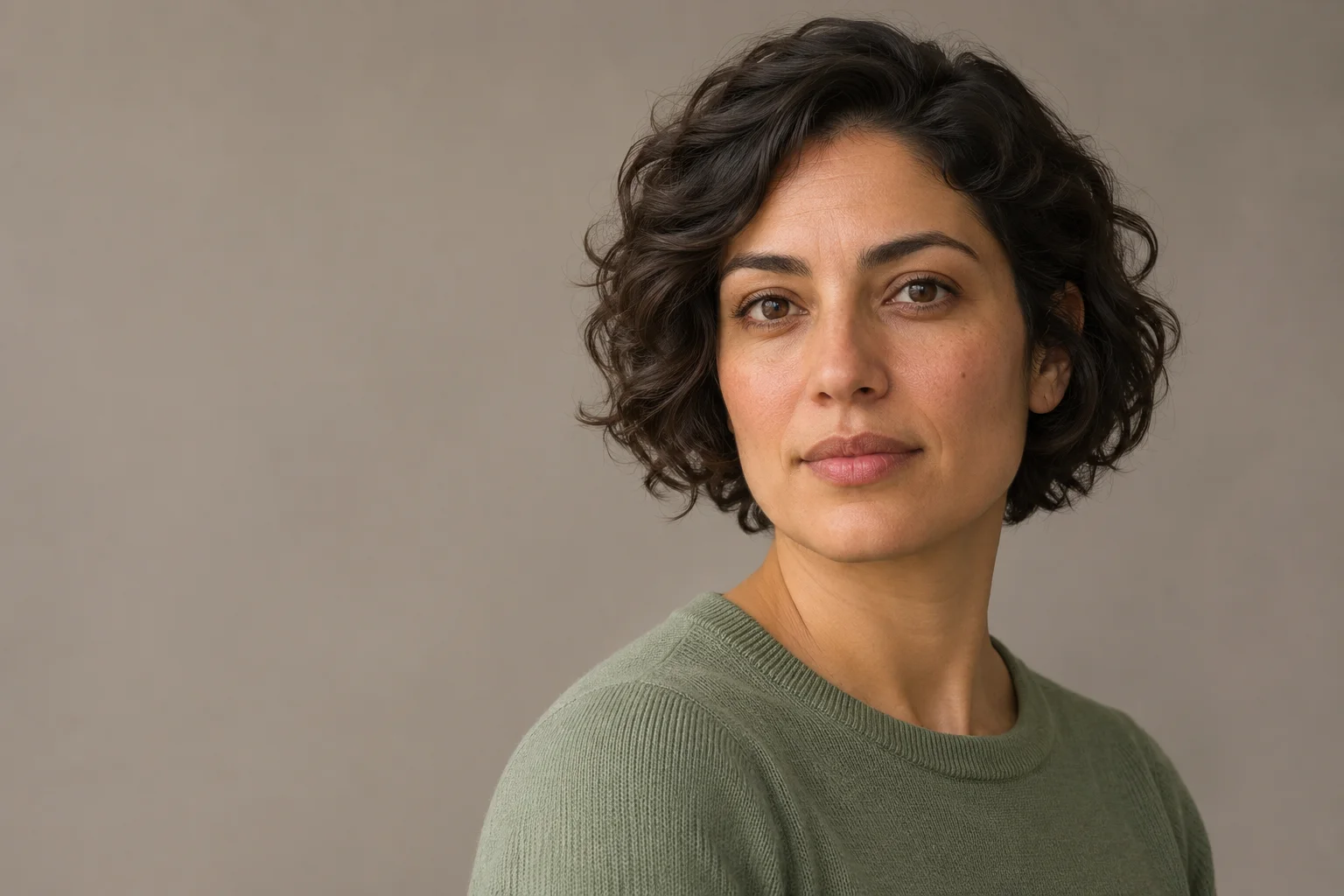
A useful Canva Craft portrait prompt describes the person, the light, and the frame before adding a style. Decide whether you need a face-led image or a person in a setting, then review the face and the intended crop separately. A convincing expression alone does not make the file ready for publication.
Prepare your brief beside the CanvaCraft image workspace. Use the options available for your selected model, check the displayed generation cost, and start with one version you can inspect. The prompts below are editorial starting points, not recorded Craft tests. All three illustrations depict fictional adults and were generated separately to explain different decisions.
Canva's Craft announcement lists portraits, people, and lifestyle scenes among its use cases. It also describes planning visual relationships before rendering. Those published capabilities support writing a deliberate composition brief; they do not guarantee a particular likeness, expression, or error-free anatomy.
Choose between a simple portrait and an environmental scene
Start with the image's job. A small author card needs a face that remains understandable after cropping. An editorial feature about making books may benefit from the workbench and materials around the person. Asking for both a tight face and a detailed room in the same image leaves the emphasis unclear.
| Intended use | Starting frame | What the prompt should emphasize |
|---|---|---|
| Fictional character introduction | Head and shoulders | Expression, headroom, plain background, visible eyes |
| Editorial story concept | Waist-up or wider | One activity, readable surroundings, person-to-setting relationship |
| Portrait detail study | Tight face view | Eye detail, hair edges, texture, eyewear if present |
These are composition choices, not platform upload specifications. For a real publication, check its actual crop and image requirements. If the image represents a named author or employee, use an approved photograph of that person rather than substituting a fictional face.
Turn lighting words into a visible instruction
“Beautiful lighting” does not tell the generator where a highlight or shadow belongs. Describe the source, its direction, and how strong the contrast should feel. For a quiet portrait, try broad soft daylight from camera left, with a gentle shadow on the opposite cheek.
Also name the background and clothing. A plain knit top against a subdued backdrop gives you fewer competing details than patterned clothing, necklaces, props, and a busy room. Add those elements only when they help the image's purpose.
Original AI-generated portrait concept illustrating soft side light and headroom. This is not a Craft test output or a photograph of a real person.
Use this suggested starting prompt:
Create an editorial portrait of one fictional adult woman with short dark
wavy hair, wearing a plain sage-green knit top. Head-and-shoulders framing,
shoulders turned slightly away from camera, both eyes visible, relaxed
neutral expression. Broad soft daylight from camera left, gentle shadow
on the opposite cheek, muted warm-gray background. Leave breathing room
above the hair and around the shoulders. Natural skin texture and
restrained retouching. No text, logos, jewelry, extra people, or props.
Change the description to suit your fictional subject. Keep the light and framing instructions clear while you assess the first result. The composition prompt guide explains how to describe relationships without stacking unrelated style words.
Give an environmental portrait one piece of context
For a story concept, choose a setting that explains what the person is doing. A bookbinder at a bench gives the background a clear role. You do not need to ask for every tool, shelf, poster, and material at once.
Describe the body position and the hands deliberately. If the activity does not need hands, a simpler crop may be easier to review. When hands are visible, inspect finger separation, contact with objects, and whether the pose makes sense before approving the scene.

Original AI-generated environmental portrait concept. The subject and studio are fictional; this image is not evidence of Craft performance or a real artisan's work.
Try a separate brief for this route:
Create an editorial concept of one fictional adult bookbinder in a small
studio. Waist-up view, wearing an unbranded navy work shirt, standing
behind a wooden bench. Hands rest naturally on the front edge of the
bench. Place a few plain closed cloth-covered books on the surface.
Soft daylight from a window on camera right, gently blurred shelves
behind the person. Keep the person prominent and the setting restrained.
No readable labels, logos, extra people, or invented business signs.
An environmental scene is a different deliverable from the simple portrait above. Separate generations may change facial features and clothing details. Do not present them as an identity-consistent series without checking that requirement through an appropriate workflow.
Reserve room for the crop you will actually use
A portrait can look balanced at full width and become awkward in a square or circular placement. Test the intended crop before spending time polishing background details. Check the top of the hair, the chin, the shoulder line, and the direction of the gaze.
When a layout needs copy beside the person, request a quiet area on the correct side. Add the approved title as editable text in your design editor. Generating a person's name inside the image makes even a small wording change depend on another edit or generation.
Choose the actual output shape in the workspace as well as describing the frame in the prompt. The aspect ratio and resolution guide covers shape and pixel dimensions. Cropping removes information; a larger export cannot restore a shoulder that was never in the image.
Inspect the face at full size, then at reading size
Review the face before the overall mood. Look at the eyes, mouth, ears, and any glasses. Check that hair edges meet the background naturally, that an eyeglass frame does not merge into the skin, and that reflections fit the lighting direction. Natural faces are not perfectly symmetrical, so assess coherence rather than demanding mirror-image features.

Original AI-generated detail illustration for the review checklist. This is a separate fictional subject, not a zoom of the earlier images or a before-and-after test.
Then look at the file at its expected display size. Small decorative details may disappear, while an overly tight crop or distracting bright background becomes more obvious. Inspect the exported file too; a good preview does not replace checking the version you will upload.
Use a short review order:
- Brief: one subject, intended pose, correct frame, and the requested setting.
- Face and body: coherent features, natural object contact, no duplicated or merged details.
- Light and material: highlights, shadows, fabric, and skin match the visual direction.
- Placement: the intended crop leaves the important parts visible.
- Publication: the caption describes the image accurately and no invented identity or endorsement is implied.
Revise the specific problem and keep a record
If the background competes with the face, ask for a quieter background. If the crop cuts the hair, request more headroom. If the skin looks excessively smooth, reduce the retouching language. Change one decision at a time so you can judge whether that instruction helped.
A revision request can be as simple as:
Keep the head-and-shoulders composition and soft side-light direction. Give the hair more space above it, simplify the background, and preserve natural skin texture.
That wording states the goal, not a guarantee that all other features will remain unchanged. Compare the next result with the brief again, especially when likeness or continuity matters.
Save the chosen file with the prompt, selected settings, and any unresolved issues. For an editorial mockup, label it as a fictional concept. For a real person's profile, move to approved real imagery and the review process appropriate to that publication. The finished deliverable should be an image whose purpose, limitations, and crop are clear to the next person using it.
Published capability statements checked against Canva's official announcement on November 8, 2026. Prompts and review recommendations are editorial guidance; no Craft generation test, identity-preservation test, or comparative benchmark is claimed.
Put your next idea into practice.
Start with a written brief in the image workspace.